 bitPix Live
For tethered shoots · iPhone & iPad · macOS 14+
Your frame count.Live, from your Capture One session.
One big number you can read from across a lit set, every shot logged as the capture folder changes, a wrap forecast that counts the changeovers too, and the selected image on your phone in a tap. The Mac is the recorder; your phone is the mirror.
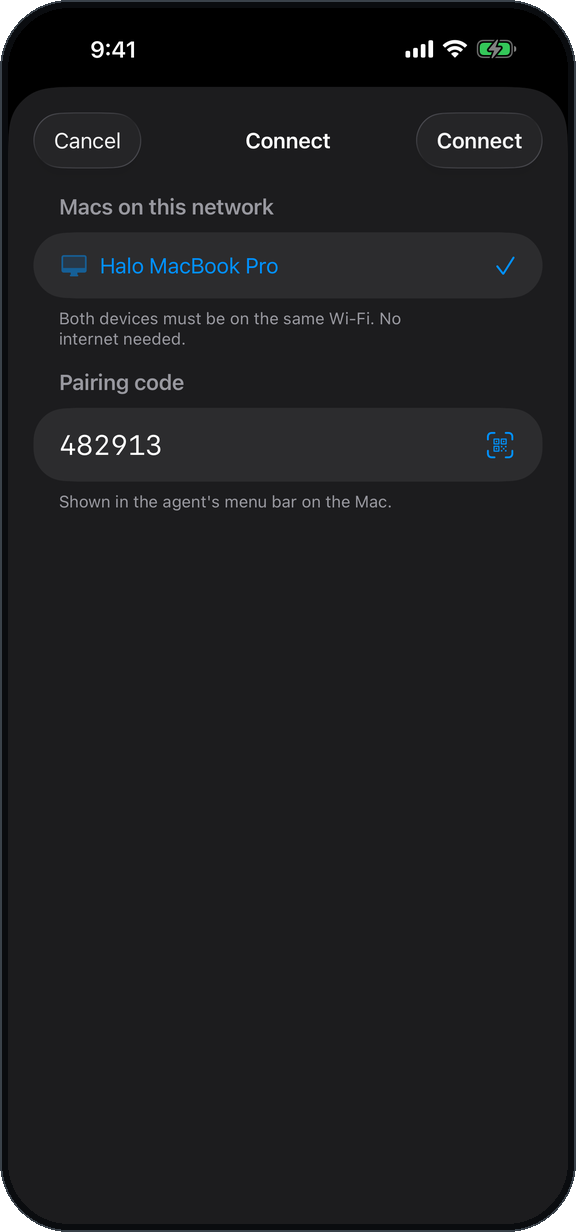
No account. No cloud. Pairs over the studio Wi‑Fi with a six‑digit code — a network with no internet works fine.
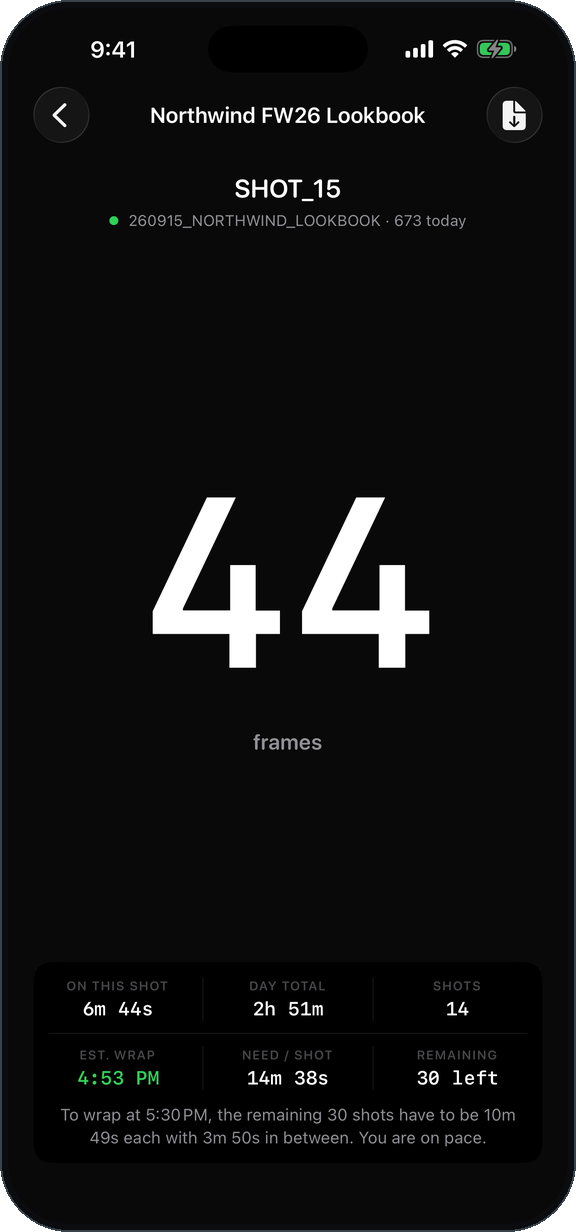
The number updates the moment a frame lands on the Mac.
How it works
Two halves, one number
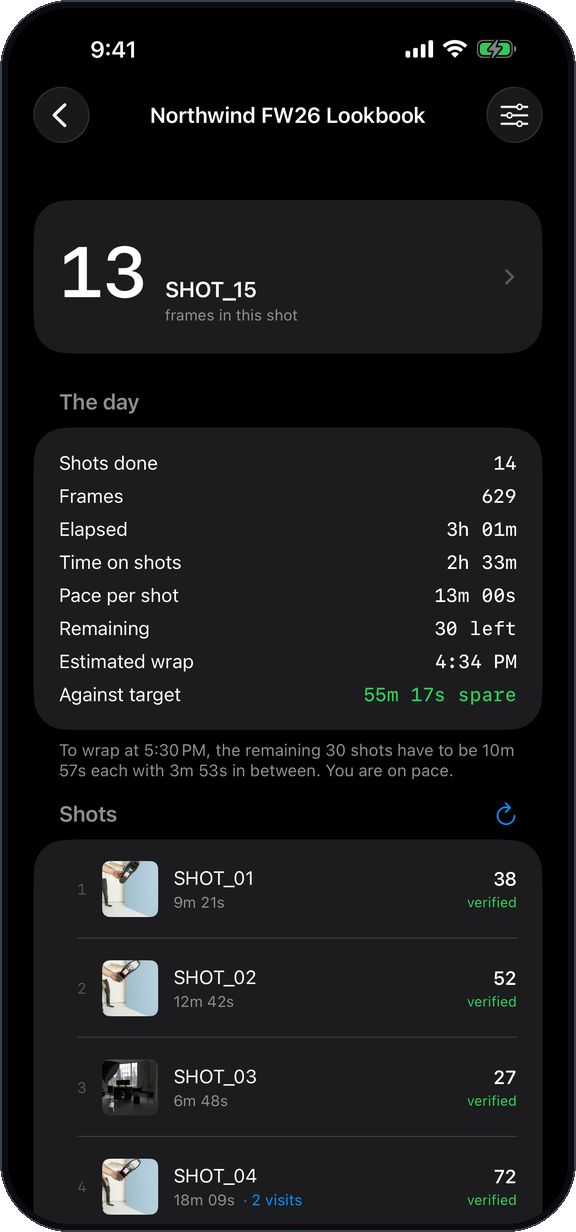
bitPix Live is a pair. A small menu bar app on the Mac reads the Capture One session — never writes to it — and serves the count over the local network. The phone finds the Mac, pairs once, and follows along.
On the Mac
bitPix Live Agent
Free. Runs in the menu bar beside Capture One Pro and asks it which folder is the capture folder.
- Counts camera raw files as they land; ignores sidecars, previews and cache
- Logs each shot as the capture folder changes, with a thumbnail
- Keeps timing on its own clock — the phone can leave and come back
- Warns you, on screen and out loud, when the Mac's battery or the capture drive's free space runs low
- Read‑only by construction. It never writes, moves, renames or deletes a file in your session
On the phone
bitPix Live for iPhone & iPad
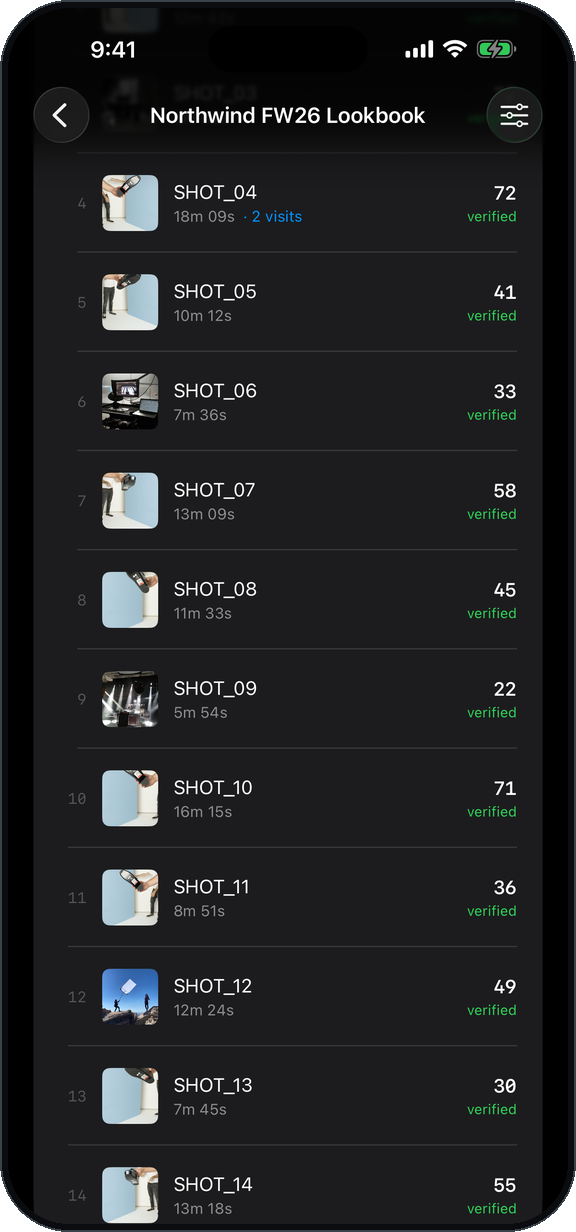
Shows what the agent sees, and keeps a job per shoot with the full shot log.
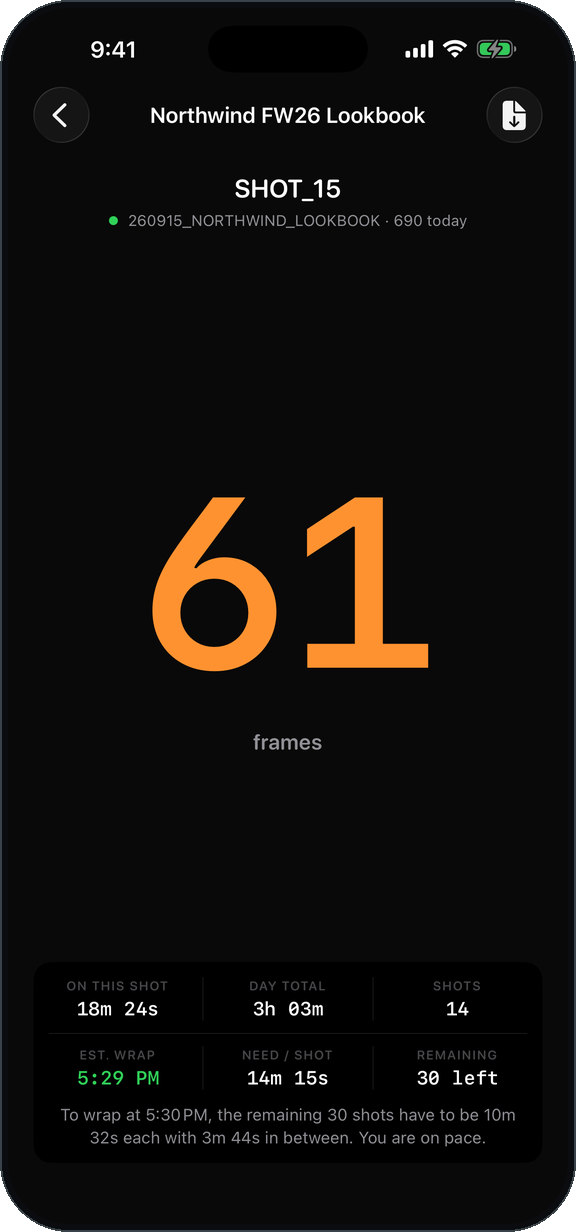
- The live count, sized to read from across the set — with the newest frame under it, a moment after it lands
- Pace, estimated wrap and what each remaining shot needs to take
- Pull the selected image from Capture One as a QuickProof JPEG — one tap
- Compare two frames, swap sides, export a PDF contact sheet
- Several phones can watch one Mac: photographer, digitech, producer, client
What it does
Built for the cart
The live count
How many frames are in the current shot, right now. Set a warn and a red threshold per job and the number changes colour with a haptic when a shot runs long.
The last frame, live
A small picture of the newest frame appears under the count a moment after it lands, straight from Capture One's own thumbnail. The count always comes first: a 20 fps burst shows its last frame just after it ends, never twenty pictures during it. Tap the frame to keep it in the gallery as a QuickProof.
Every shot, logged
Each capture folder becomes a shot with its frame count, time on set and a thumbnail. Revisit a folder after lunch and it stays one shot with two visits — not two shots.
The wrap forecast
Tell a job how many shots are planned and when you need to finish. Pace is measured against the clock, so lighting resets and wardrobe count too, and you get the pace you need to hit the target.
Counts verified against the folder
Every shot's visits are checked against each other and against what is actually in the folder on the Mac. A number you can invoice on.
Pull the selected image
One tap, and the agent has Capture One process whatever is selected as a QuickProof JPEG and sends it to your phone — the right file for a contact sheet or an FPO, with your adjustments applied. Nothing to set up. The live frame under the count works the same way: tap it to keep that frame.
Compare, and swap sides
Put any two pulled frames side by side. "Can you put that one on the left?" is one tap — the swap button trades sides without leaving the comparison.
Mood board 1.1
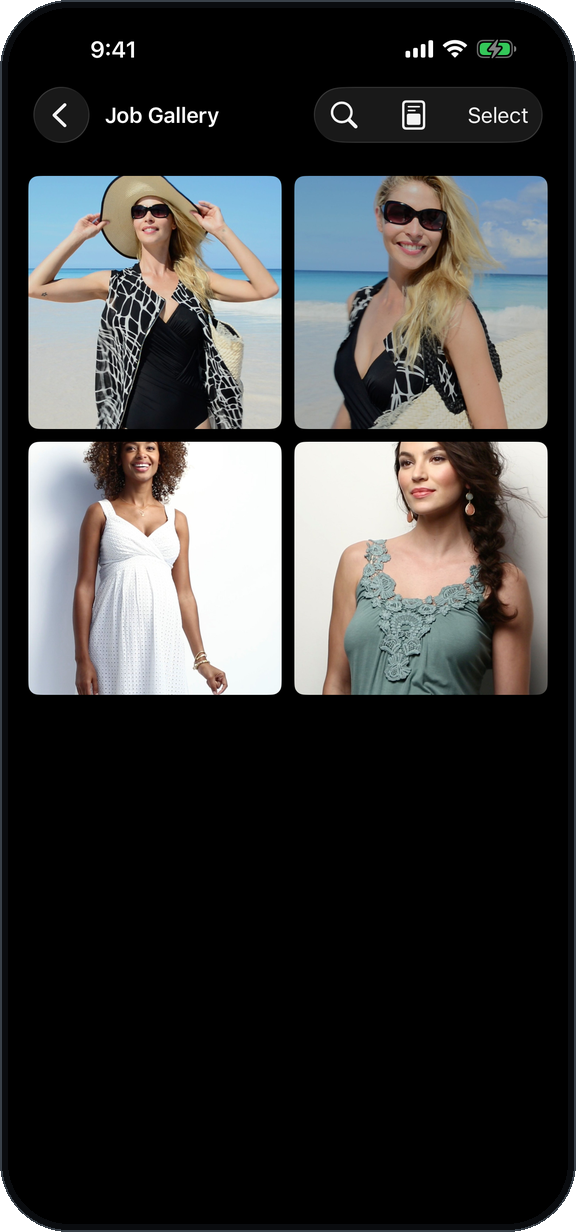
The job's pulled pictures as a wall — each at its own proportion, nothing cropped, a few featured large. Shuffle until it reads right, show it full screen, or export the exact board as a clean PDF.
Contact sheet with the shoot info on it
Export the gallery as a PDF contact sheet, and choose what goes in the header: job name, client, photographer, dates and filenames — whatever the person receiving it needs.
Raw‑only counting that says when it's wrong
Only camera raw files count, so a RAW+JPEG tether is one capture per press. A JPEG‑only tether is flagged on every screen rather than silently reading zero.
What's new
Version 1.1
In progress. Everything here ships in the next App Store release; the Mac agent updates alongside it.

Mood board
A second way to see the gallery: the job's pictures laid out as a wall, at their own proportions, a few featured large. Shuffle gives you a new arrangement; the one you like is kept with the job. Full screen turns the phone or iPad into the board. Export makes a PDF of exactly that board — clean, no header — for the client.
Sessions are never mixed
Every shot is filed by the session it was shot in, using an id the Mac agent gives each session — so two Macs running sessions with the same name stay two jobs, and a client or digitech watching several sessions can trust every number.
Connect by address, always
The address field for a Mac reached over Tailscale or a VPN is one tap away even when a local agent is found.
Small things
The version and build in Settings and in the agent's menu. Screens that no longer go blank if the connection blinks while you are on them. The agent no longer relaunches Capture One when you quit it.
Screens
Five screens. No settings hunt.
The Mac agent
Install it once. It starts with the Mac.
- Download and drag to Applications
Signed with a Developer ID and notarized, so it opens cleanly. It has no Dock icon — look for the aperture in the menu bar.
- Open Capture One Pro with a session
The agent reads the session's capture folder designation. Catalogs are not supported.
- Approve two prompts, the first time
Automation, so it can ask Capture One which folder is designated, and Local Network, so the phone can find it.
- Shooting to an external drive or a card?
Use Watch a Folder Instead… once and pick the session's Capture folder. That is also what grants macOS access to the drive.
- Pair the phone
The six‑digit code is in the agent's menu. New Pairing Code rotates it whenever you like.
bitPixLiveAgent.app
- Version
- 1.1 (build 13) · notarized
- Requires
- macOS 14 Sonoma or later, Capture One Pro
- Price
- Free
- Network
- Local only. Bonjour discovery, TLS with the pairing code as the key
- Writes to your session
- Never. The agent lists directories and reads file attributes — it does not open your images. Pulling an image is the one thing that produces a file: Capture One processes it with a recipe the agent creates for itself, and the JPEG goes to the agent's own folder, not into your session
- Alerts
- Low Mac battery and low free space on the capture drive — a notification and a spoken warning, thresholds in the menu
- Starts at login
- Optional, from the menu
Questions
Before you ask
Does it work without internet?
Yes. Everything runs over the local network. A studio Wi‑Fi with no outside connection is fine, and on location with no Wi‑Fi at all the phone can still find the Mac over peer‑to‑peer.
Do I need an account?
No. There is no account, no sign‑in and no server. The pairing code shown on the Mac is the whole of it.
What if I put the phone in my pocket and walk out of range?
The Mac keeps counting and timing. When the phone reconnects it replays the shots it missed, in order, with their timing intact.
Can more than one person watch?
Yes. Any number of phones and iPads can pair with the same Mac — photographer, digitech, producer, client.
Does the agent touch my files?
It never writes, moves, renames or deletes anything in a session. It reads directory listings and file attributes to count frames, and copies Capture One's own cached thumbnails to show you a shot. The one step that produces a file is pulling an image: the agent asks Capture One to process it as a QuickProof with a recipe the agent creates for itself (named "bitPix Live QuickProof", kept disabled so your own Process button never runs it), and Capture One writes those JPEGs to the agent's own folder — not into your session. Your raws, your Capture folder and your Output folder are not touched.
Catalogs?
Not yet. The agent reads the capture folder of an open session. If you shoot into a catalog, point it at the folder directly with Watch a Folder Instead….
Is bitPix Live made by Capture One?
No. bitPix Live is made by bitPix Digital, an independent studio, and is not affiliated with or endorsed by Capture One A/S. Capture One is a trademark of Capture One A/S.